Plain message
FastestBest for a short, one-off errand.
- ✓ No setup
- × No ticking
- × Sender edits only
- × Gets buried
You send your partner a list of five things on the way to the shop. By the time they get there it's four messages up the chat, they've bought three of them, and neither of you knows what's left.
The obvious fix would be a built-in shopping list. WhatsApp doesn't have one. It does have a feature called Lists, introduced in late 2024 — but despite the name, that's a way to filter your chats into categories like Work or Family. It has nothing to do with shopping. WhatsApp described it as a way to filter chats into custom categories.
Worth knowing
WhatsApp Lists organise conversations; they do not create tickable items inside a chat. The similar name is easy to misread, so this guide separates WhatsApp's actual features from shopping-list workarounds.
What this guide covers
Conclusion first. Here's how the four options compare.
Best for a short, one-off errand.
Best for deciding who brings each item.
Best when visibility matters more than editing.
One live list that everyone can update.
| Plain message |
Poll | Pinned message |
Link-share list |
|
|---|---|---|---|---|
| Speed to set up | ★★★★★ | ★★★★☆ | ★★★★☆ | ★★★★☆ |
| Tick items off | ✕ | Sort of | ✕ | ✓ |
| Both people can add items | ✕ | ✕ | ✕ | ✓ |
| Stays out of the chat scroll | ✕ | ✕ | ✓ | ✓ |
| Nothing to install | ✓ | ✓ | ✓ | ✓ |
| Reusable while active | ✕ | ✕ | ✕ | ✓ |
"Sort of" for polls: people can tap an option to mark it, but a poll is a vote, not a checklist — see method 2 for what that means in practice.
Want to skip straight to the option where both of you can tick things off?
Make a shared list — free, no sign-upThe default. Type the items out, one per line, and send. It sounds too basic to write down, but for a short list it genuinely is the fastest thing you can do.
This is the best-kept secret of the four, and the closest WhatsApp gets to a real checklist. Create a poll where each shopping item is an option. Whoever is at the shop taps an item as they put it in the trolley, and everyone in the chat sees the tally update.
It works best for the "who's bringing what" problem — a barbecue, a picnic, a shared dinner — where each person claims items rather than one person buying everything.
This doesn't solve ticking items off, but it solves the most common complaint: the list disappearing up the chat. Pinning keeps it at the top where both of you can reach it.
Shopping alone? Use Message Yourself instead — your own name appears at the top of the contact list when you start a new chat. It's a decent private notepad, though of course nobody else can see it.
None of the three above let both of you edit the same list. That's what method 4 fixes.
Try a shared listInstead of putting the list in the chat, you make the list on a web page and send the link through WhatsApp. Whoever opens the link sees the same live list — both of you can add items and tick things off, and it updates on the other person's screen.
The catch with most shopping list apps is that everyone has to download the app and make an account. That's usually where the idea dies — one person installs it, the other never does. Link-share tools avoid that by running in the browser. OtsukaiMemo, which we make, works this way.
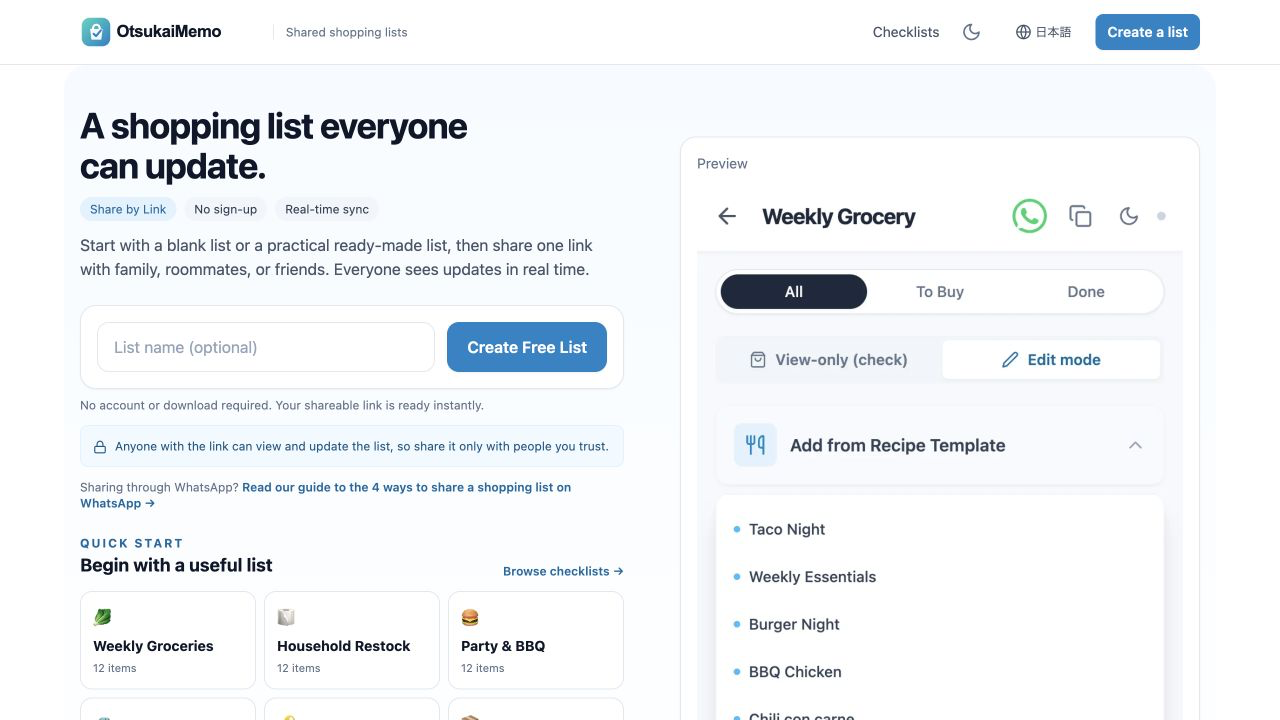
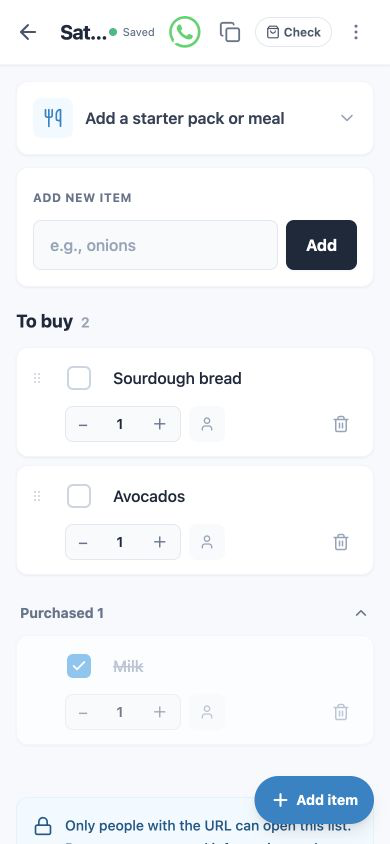
Screenshots taken from the English version of OtsukaiMemo in July 2026. Labels may move as the interface evolves.
→ Just send a message. Anything more is overkill. Pin it if the chat is busy.
→ Use a poll. People claim items themselves and nobody has to co-ordinate it. This is what polls are genuinely good at.
→ Use a link-share list. This is the case the first three methods can't handle — you need something both of you can edit throughout the week, not a snapshot sent once.
→ Consider Apple Reminders. On supported devices with iCloud Reminders enabled, its Grocery list can sort items into categories and support collaboration. You can send the invitation through Messages or another sharing option. It is a strong fit for an Apple-only household; a browser link is simpler when devices or accounts are mixed.
No. The feature called Lists filters your chats into custom categories — WhatsApp describes it as a way to "filter your chats with custom categories of your choice". It doesn't create a list of shopping items. To share an actual shopping list you need one of the four methods above.
Not in a normal message. A poll is the closest built-in option — people tap an option to mark it. For a real tick list that both people update in real time, you need a link-share list opened in the browser.
No, with any of these methods. Messages, polls and pins are inside WhatsApp. A link-share list opens in the phone's browser, so there's nothing to download and no account to create — which matters when the other person isn't going to install an app just for a shopping list.
Only with method 4. A plain message can be edited by the sender for a short window after sending, and not at all by the recipient. Polls let others vote but not add items. A link-share list is the only option here where both people genuinely share one list.
Consider a shared Grocery list in Apple Reminders. On supported devices with iCloud Reminders enabled, it can categorise items automatically and let invited people collaborate. Apple documents both Grocery lists and shared-list collaboration.
Telegram supports collaborative checklists, including shopping lists. A Telegram Premium user must create the checklist; its permissions can then allow other people to add items or mark them complete. See Telegram's feature announcement.
Feature names and limits can change by app version or platform. This guide was reviewed on 28 July 2026 against the following product documentation and announcements.
WhatsApp has no shopping list feature, and the thing named Lists isn't one. So it comes down to picking the least awkward workaround for your situation.
For a handful of items, a plain message is fine — pin it if the chat moves quickly. For splitting who brings what, a poll is genuinely good. For a list that both of you keep adding to during the week, none of WhatsApp's built-in options work, and a link you can both open is the practical answer.
Free, no sign-up, nothing to install. Name your list, add items, send the link to your WhatsApp chat.
Create a shopping list